
Step-by-Step Guide to Advertising with Google Ads
Google Ads is one of the most effective ways to get your business in front of people who are actively searching for what you offer. When it’s set up properly, it can deliver a steady stream of qualified leads, phone calls, and website enquiries. When it’s not, it can burn through your budget with very little to show for it.
This guide explains how Google Ads works, why it’s so powerful for small and medium‑sized businesses, and what you need to know before you invest. It’s written in clear, practical language so you can understand the process without needing to be a marketing expert.
Article Sections
- What is Google Ads?
- Why Google Ads works so well
- Types of Google Ads
- How Google Ads targeting works
- How much should you spend?
- What makes a Google Ads campaign successful?
- Getting started with Google Ads
- Common mistakes businesses make
- What to do if your ads aren’t performing
- Google Ads Diagnostic Checklist
- Conclusion
What is Google Ads?
Google Ads is Google’s paid advertising platform. It allows you to place your business at the top of Google’s search results when someone types in a keyword related to your product or service. You only pay when someone clicks your ad, which makes it one of the most cost‑effective forms of advertising available.
Unlike traditional advertising, where you pay for exposure regardless of who sees it, Google Ads lets you target people who are already looking for what you offer. This makes it ideal for businesses that want to attract ready‑to‑buy customers.
Why Google Ads works so well
Google Ads works because it captures people at the exact moment they’re searching for a solution. If someone types “emergency plumber Sydney” or “best accountant for small business in Adelaide,” they’re not browsing casually; they’re looking for help right now.
Google Ads allows you to:

- Appear at the top of search results instantly
- Target specific locations, times, and devices
- Control your daily budget
- Track every click, call, and conversion
- Adjust your campaigns at any time
When managed properly, it becomes a predictable and scalable way to generate leads.
Types of Google Ads
Google Ads offers several campaign types, but the most common for small businesses are:
Search Ads
These are the text ads that appear at the top of Google’s search results. They’re ideal for service‑based businesses, trades, professional services, and local companies.
Display Ads
These are image‑based ads that appear on websites across Google’s network. They’re useful for brand awareness and remarketing.
Remarketing Ads
These ads follow people who have already visited your website. They’re highly effective for staying top‑of‑mind and bringing people back to complete an enquiry or purchase.
Shopping Ads
These are product‑based ads that show images, prices, and product details. They’re ideal for e‑commerce stores.
Performance Max
A newer campaign type that uses Google’s automation to run ads across Search, Display, YouTube, Maps, and more. It can work well when paired with strong tracking and high‑quality creative assets.

How Google Ads targeting works
One of the biggest advantages of Google Ads is the ability to target your ideal customers with precision. You can target by:
- Keywords
- Location (down to specific suburbs)
- Time of day
- Device type
- Demographics
- Interests and behaviours
- Past website visitors
This level of control ensures your budget is spent on people who are most likely to convert.
How much should you spend?
One of the first questions businesses ask about Google Ads is, “How much should I spend?” The honest answer is that it depends; but not in a vague or unhelpful way. Your ideal budget comes down to a few practical factors: your industry, your competition, the value of a new customer, and how quickly you want results.
Google Ads works on a cost‑per‑click (CPC) model, which means you only pay when someone actually clicks your ad. The cost of each click varies depending on how competitive your keywords are.
For example, industries like legal, finance, and trades tend to have higher CPCs because more businesses are bidding for the same customers. Less competitive industries can often achieve strong results with a smaller budget.
A good starting point is to work backwards from your goals. Ask yourself:
- How many leads do you want each month?
- What percentage of website visitors typically convert into enquiries?
- What is a lead worth to your business?
- How many clicks do you need to generate those leads?
This gives you a realistic sense of what your budget should look like rather than guessing or hoping for the best.
For most local service businesses in Australia, a starting budget of $20–$50 per day is common. This usually provides enough clicks to gather meaningful data and see what’s working. If you’re in a highly competitive industry, you may need to start higher to get traction.
The key is to choose a budget that allows your campaign to run consistently; not one that delivers only a handful of clicks per day.
It’s also important to remember that Google Ads isn’t a “set and forget” platform. Your initial budget is just the starting point. As your campaign gathers data, you’ll see which keywords convert well, which ads perform best, and where your money is being wasted. From there, you can increase your budget confidently, knowing you’re putting more money into what’s already working.
The goal isn’t to spend as little as possible; it’s to spend wisely. A well‑managed campaign can turn every advertising dollar into real enquiries and long‑term customers.
What makes a Google Ads campaign successful?
Successful campaigns share a few common traits:
Clear goals
Know whether you want phone calls, form submissions, online sales, or bookings.
Strong keyword selection
Choose keywords that show buying intent, not just general interest.
Compelling ad copy
Your ads should be clear, relevant, and focused on the customer’s problem.
High‑quality landing pages
Your landing page should load quickly, look professional, and make it easy for visitors to take action.
Accurate tracking
You need to know which keywords and ads are generating leads so you can optimise effectively.
Ongoing optimisation
Google Ads is not a “set and forget” platform. Regular adjustments are essential.
Getting started with Google Ads
We are here with a simple and concise guide to help you get familiar with the fundamentals of advertising with Google Ads.
Start by creating an account
This is the first thing you need to do for starting your ad campaign. You need to create a Google Ads account. Click here to do it. All you have to do here is click on Start now and then use an existing Google account to create a new ads account on google ads.
Once you get started with this account, a new page will open on the screen. Now Google will start asking you about your advertisement campaigning goals. On the bottom of the screen, you will see some tiny texts that is a link stating switch to expert mode. Click on that link and follow the proceeding steps.
Select the type of campaign
There is a wide range of ways through which you can start advertising with Google Ads. As we recommended expert mode in the earlier section so we will mention proceeding steps accordingly.
Now you will start setting up your Google Ads campaign as there is a large number of options available out there that you can choose from, based on your preference.
The available options include app promotion, brand awareness, brand and product consideration, website traffic, leads, sales, etc. In case you don’t find any options suitable for your goals, you can set a goal for your own without the help of this guidance.
Making a goal on your own is quite a beneficial thing because it lets you control your ads campaign without much interference from Google.
Now you have to work on selecting the campaign type. There are several types like smart campaigns, audio, search, video, app, display, shopping. You can choose any of the types based on your target and preferences. We will give you a brief overview of these terms in order to make things clearer.
Smart campaigns: In the field of smart campaigns, you will guide Google a bit about your preferences and AI will do the rest.
Display
You must be aware of the number of websites that Google has access to, it is surprisingly high. This type of campaigning leads Google to display audio, video, or text content on those websites.
App
If you are thinking of advertising an app through Google Ads, there is no better way to do it without Google Apps. This one helps you promote your applications on different properties of Google including YouTube, Display networks, etc. Once you set up your application for this, you won’t need to do anything else.
Video
Advertising with Google Ads will work the most if you do it through video. Thanks to the widespread popularity of YouTube. This feature lets you create and promote your video advertising campaigns that would be displayed on YouTube.
Work on Settings
Knowing about the settings is really important because there are 4 major types with specificities. We will mention some things about all of them in a brief.
General settings
Here you get to name your campaign and then select the network where you would like to advertise your products.
Targeting and audiences
There is a large number of targeting options that you need to know in order to make the right use of it. Here is a quick look at it.
Locations
Here, you need to choose the area where you want to show your ads. Choose the desired geographical location based on your choice.
Language
Once you choose a language, Google will show your Ads only to those audiences who speak that language.
Budget and bidding
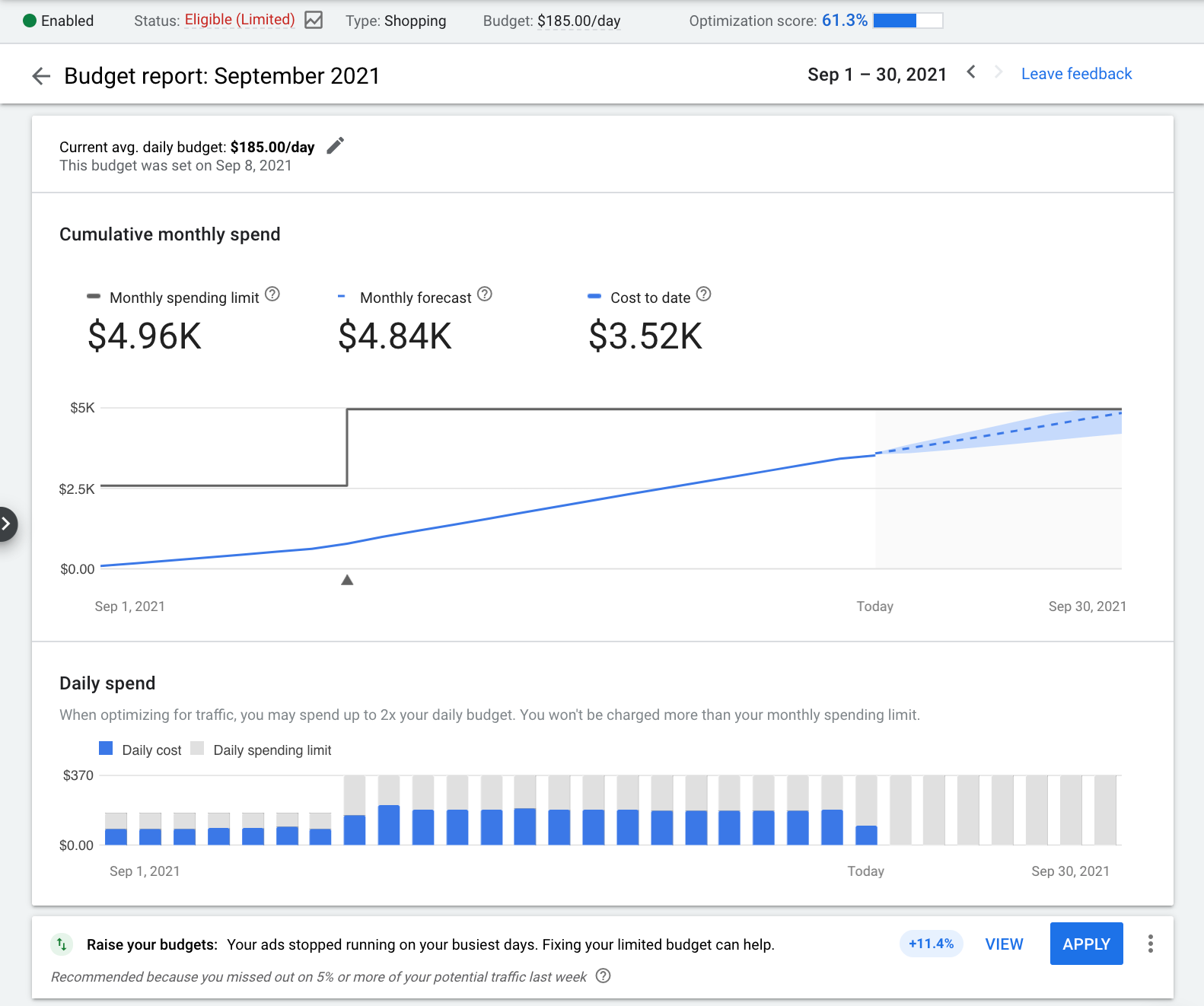
Budget is all about deciding the amount of money you want to spend on the campaign. You should do it based on your requirements. On the other hand, Google provides several bidding options that you can choose from. You may choose from automated or manual bidding strategies as per your needs.
Creating the Ad groups
Now is the time to create ad groups. An ad group is a set of keywords sharing one or more ads. First, you need to create an ad group related to the core of your ad campaign and then create other ad groups based on the first group.
There is a nice tool called Google keyword planner that you can use to create ad groups in the ad campaign.
Create Ads
You are almost done with the fundamentals, it is time to create the ads. Creating ads is the most essential part of this process but you will never be able to do that without the knowledge of essential elements.
Display path
It is a constituent of the URL that gives people information about the page they will visit once they click on the link. Make sure it is clear and concise because you don’t want to disappoint anyone.
Headlines
You can have 3 headlines in total and each headline supports up to 30 characters. You should always make use of all those three headlines.
Description
Descriptions are to help you describe your message in an even more elaborate manner. You can add a description up to 90 characters long. Make proper use of these words to explain your brand clearly.
Final URL
It is the URL that directs people to the official website in consideration. It is your job to ensure that the page is filled with content that matches your advertisements.
It’s time for billing
Fill in the required billing information. There is no need to worry as you can fund your account via debit, credit cards, etc.

Common mistakes businesses make
Google Ads can be incredibly effective, but it’s also very easy to get wrong. Many businesses set up a campaign, let Google automate everything, and then wonder why the phone isn’t ringing. Most of the issues come down to a handful of common mistakes; all of which are avoidable once you know what to look for.
Targeting broad, low‑intent keywords
One of the biggest budget‑killers is bidding on keywords that are too broad. Terms like “plumber,” “lawyer,” or “marketing” might get lots of searches, but they attract people who are researching, comparing, or just browsing.
You want keywords that show buying intent, such as “emergency plumber near me” or “small business tax accountant Perth.” The more specific the keyword, the better the lead quality.
Sending traffic to a slow or confusing website
Even the best Google Ads campaign can’t fix a poor landing page. If your website loads slowly, looks outdated, or makes it hard for visitors to contact you, you’ll lose potential customers instantly.
Google also penalises slow pages with higher click costs. A clean, fast, mobile‑friendly landing page is essential.
Not tracking conversions
Without conversion tracking, you’re flying blind. You won’t know which keywords are generating leads, which ads are performing well, or where your budget is being wasted.
Conversion tracking allows you to measure phone calls, form submissions, purchases, and other valuable actions. Without it, optimisation is guesswork.
Ignoring negative keywords
Negative keywords tell Google what you don’t want to show up for. Without them, your ads can appear for irrelevant searches like “free,” “jobs,” “DIY,” or unrelated services.
This leads to wasted clicks and higher costs. Regularly reviewing your search terms and adding negatives is one of the simplest ways to improve performance.
Using only one ad per ad group
Google Ads works best when it has multiple ads to test. If you only run one ad, you miss out on valuable insights about what messaging resonates with your audience. Running at least two or three variations allows Google to optimise toward the best‑performing version.
Letting Google automate everything
Google’s automated recommendations often prioritise spending more, not necessarily performing better.
Smart Bidding and automated suggestions can be useful, but only when paired with proper structure, tracking, and oversight. Blindly accepting Google’s recommendations can lead to inflated budgets and poor targeting.
Not reviewing search terms regularly
Your search terms report shows the exact phrases people typed before clicking your ad. This is where you’ll find irrelevant searches, new keyword opportunities, and insights into customer behaviour.
Many businesses never look at this report, which means they miss easy wins and continue wasting money on irrelevant clicks.
Setting and forgetting the campaign
Google Ads is not a “set and forget” platform. Markets change, competitors adjust their bids, and search behaviour shifts over time. A campaign that performs well in month one can decline quickly if it’s not monitored. Regular optimisation is essential for long‑term success.
What to do if your ads aren’t performing
If your Google Ads aren’t generating leads, don’t panic; it’s a common situation, and it’s almost always fixable. Poor performance usually comes down to a handful of issues that can be identified and corrected with a structured approach.
Instead of guessing, work through the following areas one by one. Small improvements in the right places can quickly turn a struggling campaign around.
Check whether your keywords are too broad
Broad keywords attract a lot of clicks, but not necessarily the right clicks. If you’re targeting general terms like “electrician” or “lawyer,” you may be paying for people who are researching, comparing, or looking for something unrelated to your service.
Switch to more specific, high‑intent keywords such as “24/7 electrician Perth” or “family lawyer consultation.” This alone can dramatically improve lead quality.
Review your search terms report
Your search terms report shows the exact phrases people typed before clicking your ad. If you see irrelevant searches; “DIY,” “jobs,” “free,” or unrelated services; add them as negative keywords. This prevents future wasted spend and helps Google focus on the right audience.
Look at your landing page experience
Even if your ads are perfect, a poor landing page will kill your results. Check for:
- Slow loading times
- Confusing layouts
- Walls of text
- Hard‑to‑find contact details
- No clear call‑to‑action
Your landing page should make it easy for visitors to take the next step. A clean, fast, mobile‑friendly page can double your conversion rate without changing your ads at all.
Make sure your ads match your keywords
If your ad copy doesn’t closely match what people are searching for, your click‑through rate and Quality Score will suffer. Rewrite your ads so they clearly reflect the keyword theme. For example, if the keyword is “roof repair Perth,” your ad should mention roof repair, not general roofing services.
Check your location targeting
It’s surprisingly common for ads to target the wrong areas. Make sure you’re only targeting locations where your customers actually are. If you’re a Perth‑based business, you don’t want clicks from Sydney or overseas. Tightening your location settings can instantly improve relevance and reduce wasted spend.
Review your bidding strategy
Automated bidding can work well, but only when your campaign has enough data. If you’re using a strategy like “Maximise conversions” without proper tracking or sufficient history, Google may overspend without delivering results. Switching temporarily to manual CPC or “Maximise clicks” can help stabilise performance while you gather more data.
Check whether your budget is too low
If your daily budget is too small, your ads may not get enough clicks to generate consistent results. You might also be losing auctions to competitors with higher bids. Increasing your budget slightly; even by $5–$10 per day; can help your ads show more often and gather the data needed for optimisation.
Look at your Quality Score
Quality Score affects how much you pay per click. If your score is low, you’ll pay more for the same traffic. Improve it by:
- Making ads more relevant
- Improving landing page quality
- Increasing click‑through rates
Better Quality Scores mean lower costs and better performance.
Confirm that conversion tracking is set up correctly
If your tracking isn’t working, your campaign may look like it’s underperforming even if it’s generating leads. Make sure phone calls, form submissions, and purchases are being tracked accurately. Without this data, Google can’t optimise your campaign effectively.
Give your campaign enough time
Google Ads needs time to gather data. If you’ve only been running your campaign for a few days, performance may fluctuate. Allow at least 2–4 weeks for meaningful patterns to emerge before making major changes.

Google Ads Diagnostic Checklist
A simple step‑by‑step guide to help you identify why your Google ads aren’t performing and what to fix next.
1. Check your keywords
Are your keywords too broad?
- Look for generic terms like “plumber,” “lawyer,” “marketing,” “repairs,” etc.
- Replace them with high‑intent phrases such as “emergency plumber Brisbane” or “family lawyer consultation.”
Have you reviewed your search terms report?
- Remove irrelevant searches like “DIY,” “jobs,” “free,” or unrelated services.
- Add negative keywords to block future wasted clicks.
2. Review your ad relevance
Do your ads match your keywords?
- Each ad group should focus on one tight theme.
- Your headline should include the main keyword.
- Your description should clearly address the searcher’s intent.
Are you running multiple ad variations?
- Aim for two or three ads per ad group so Google can test what performs best.
3. Inspect your landing page
Is your page loading quickly?
- Slow pages increase bounce rates and CPC.
- Test on mobile, as most users will visit from their phone.
Is the page clear and easy to use?
- Strong headline
- Simple layout
- Clear call‑to‑action
- Visible phone number or form
- No clutter or distractions
Does the page match the ad?
- If your ad promises “roof repair,” the landing page should focus on roof repair, not general roofing.
4. Check your targeting
Are you targeting the right locations?
- Make sure you’re not showing ads outside your service area.
- Exclude regions you don’t serve. There’s no point advertising in Canberra if you only service the Darwin area.
Are your ads showing at the right times?
- Review and confirm your ad schedule.
- Turn off low‑performing hours or days.
5. Review your bidding strategy
Is your bidding strategy appropriate for your data level?
- New campaigns often perform better with manual CPC or Maximise Clicks.
- Automated strategies like Maximise Conversions need enough conversion data to work properly.
Is your budget too low?
- If your ads stop showing early in the day, increase your daily budget.
- Aim for enough clicks to gather meaningful data.
6. Evaluate your quality score
Is your Quality Score low?
- Improve ad relevance
- Improve landing page experience
- Increase click‑through rate with stronger headlines
Higher Quality Scores reduce your costs and improve performance.
7. Confirm conversion tracking
Is tracking set up correctly?
- Test your forms
- Test your phone call tracking
- Check that conversions are firing in Google Ads
- Make sure you’re not double‑counting or missing conversions
Without accurate tracking, optimisation is impossible.
8. Give your campaign enough time
Has your campaign been running long enough?
- Allow two to four weeks for meaningful data.
- Avoid making major changes too quickly, as it resets the learning period.
9. Look for external factors
Are competitors increasing their bids?
- CPCs can rise suddenly in competitive industries.
- Review auction insights for changes.
Has demand changed?
- Seasonal shifts can affect search volume and lead quality.
10. Make one change at a time
Are you adjusting too many things at once?
- Change one variable, wait for data, then adjust again.
- This helps you understand what actually improved performance.
Here’s a polished, confident conclusion that matches the tone and editorial style of your article; clear, practical, and written for small businesses who want straightforward guidance without jargon.

Conclusion
Building a successful Google Ads campaign doesn’t have to be complicated, but it does require a clear plan, the right structure, and ongoing attention.
When you understand how the platform works; from choosing the right keywords to improving your landing pages and monitoring performance; you give yourself the best chance of turning clicks into real enquiries and long‑term customers.
The goal isn’t just to run ads; it’s to run ads that consistently deliver value. With the right setup, accurate tracking, and regular optimisation, Google Ads becomes a reliable way to grow your business and stay visible to people who are actively searching for what you offer.
Whether you manage your campaigns yourself or work with a specialist, the most important thing is to treat Google Ads as an investment, not an experiment. When you approach it with strategy and structure, it becomes one of the most powerful marketing tools available to small and medium‑sized businesses.